MEET ELVYNOR
Stop searching.
Start asking.
Upload what matters. Ask what you need.
A quieter way to keep life in order — and find what matters when you need it.
Ask Elvynor
- Example question: When does Sam’s passport expire? Example answer: Sam’s passport expires on 14 March 2029.
- Example question: Where is Maya’s Emirates ID? Example answer: I have Maya’s Emirates ID on file.
- Example question: When does our car insurance expire? Example answer: Land Cruiser’s motor insurance expires on 3 March 2027.
- Example question: Where is Leo’s birth certificate? Example answer: I have Leo’s birth certificate on file.
- Example question: When was Milo’s last vaccination? Example answer: Milo’s last rabies vaccination was on 15 March 2026.
Illustrative example with a fictional household — not a live session.
It began with a simple question that somehow asked for more than an answer.
Someone asks, “Where is that document?” or “When does this expire?” Or you need one small detail to complete an online form or application — and you know the answer is somewhere.
Maybe in an app. Maybe in an email. Maybe in Drive. Maybe in a folder you named six months ago.
You pause, search, remember, check again.
It’s a small thing — until you realise how often life asks you to do it.
Elvynor began from that feeling. The idea was simple: what if your household had something that could remember the important details for you, and answer when you needed them?
Not another place to manage.
Just something you can ask naturally, the way you would ask someone who already knows. You don’t have to remember every detail; Elvynor keeps things in order, so there’s simply less to carry in your head.
Live more. Remember less.
How it works
You add it. Elvynor reads it.
You check it.
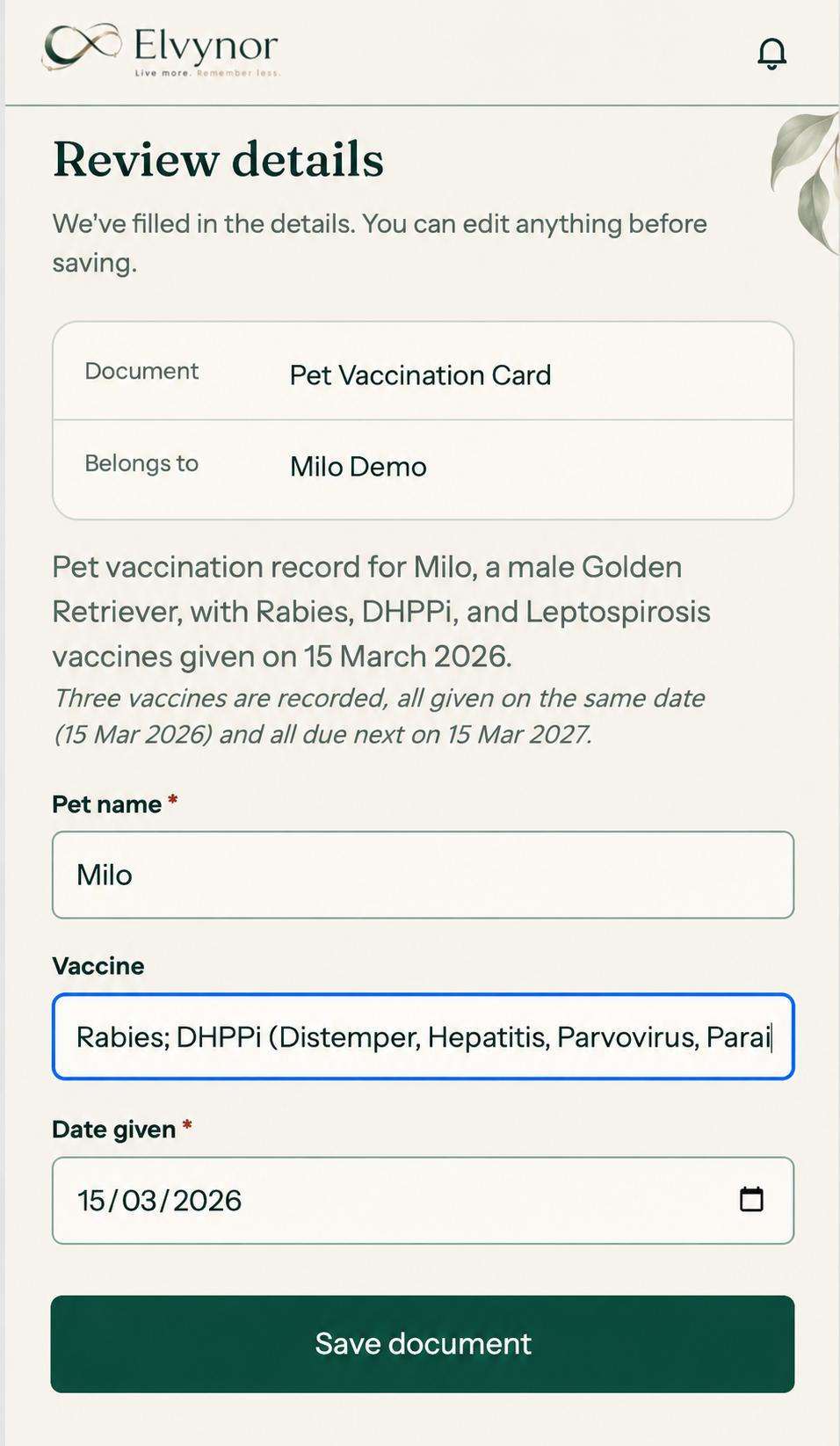
- Document and owner filled in
- Details read from the card
- Nothing saved until you tap Save
1
Add a document
Take a photo or add a PDF, and choose who or what it belongs to.
2
Elvynor reads it
It suggests the details that matter, like names, numbers and dates.
3
You check
Correct anything it got wrong, then confirm.
4
It’s filed in your Drive
The document is saved to an Elvynor folder in your Google Drive.
5
It’s remembered
Its dates show up in what’s coming, and you can ask about it.
Ask Elvynor
Don’t search. Just ask.
Ask in your own words. Elvynor understands who or what your documents belong to — people, cars, pets and your home — and answers from the details you’ve checked.
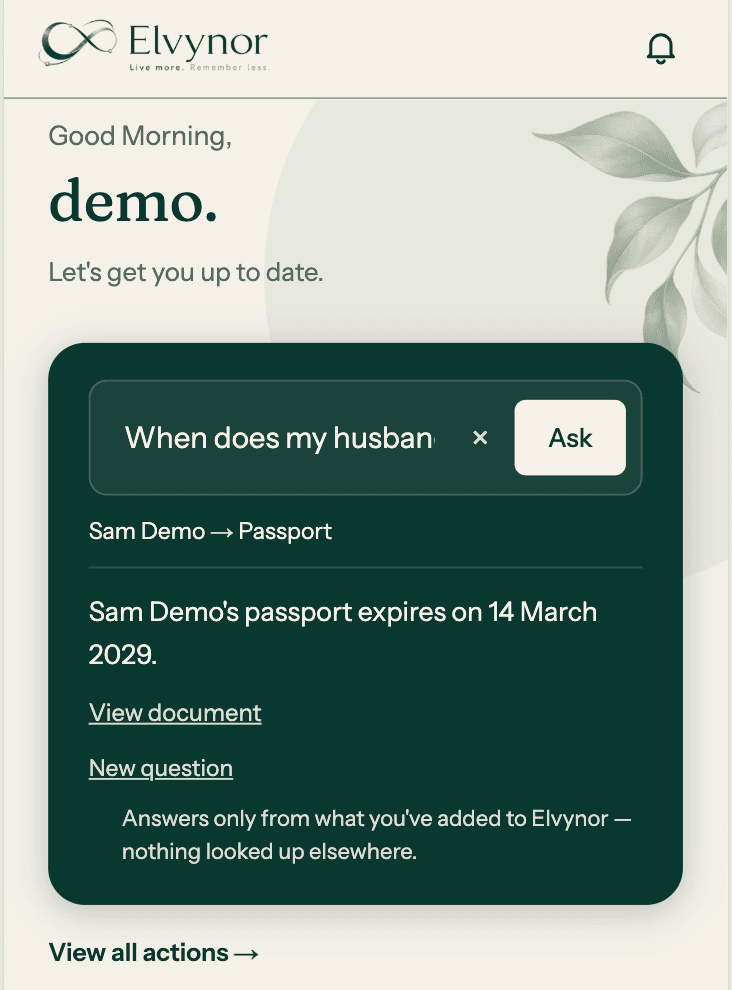
- “My husband” → Sam Demo
- Answered from the saved passport
- Only from what you’ve added
Remember
Important dates shouldn’t live in your head.
Elvynor keeps the dates from your documents in view — what needs attention today, and what’s coming up over the next few months — so you don’t have to hold them all in mind.
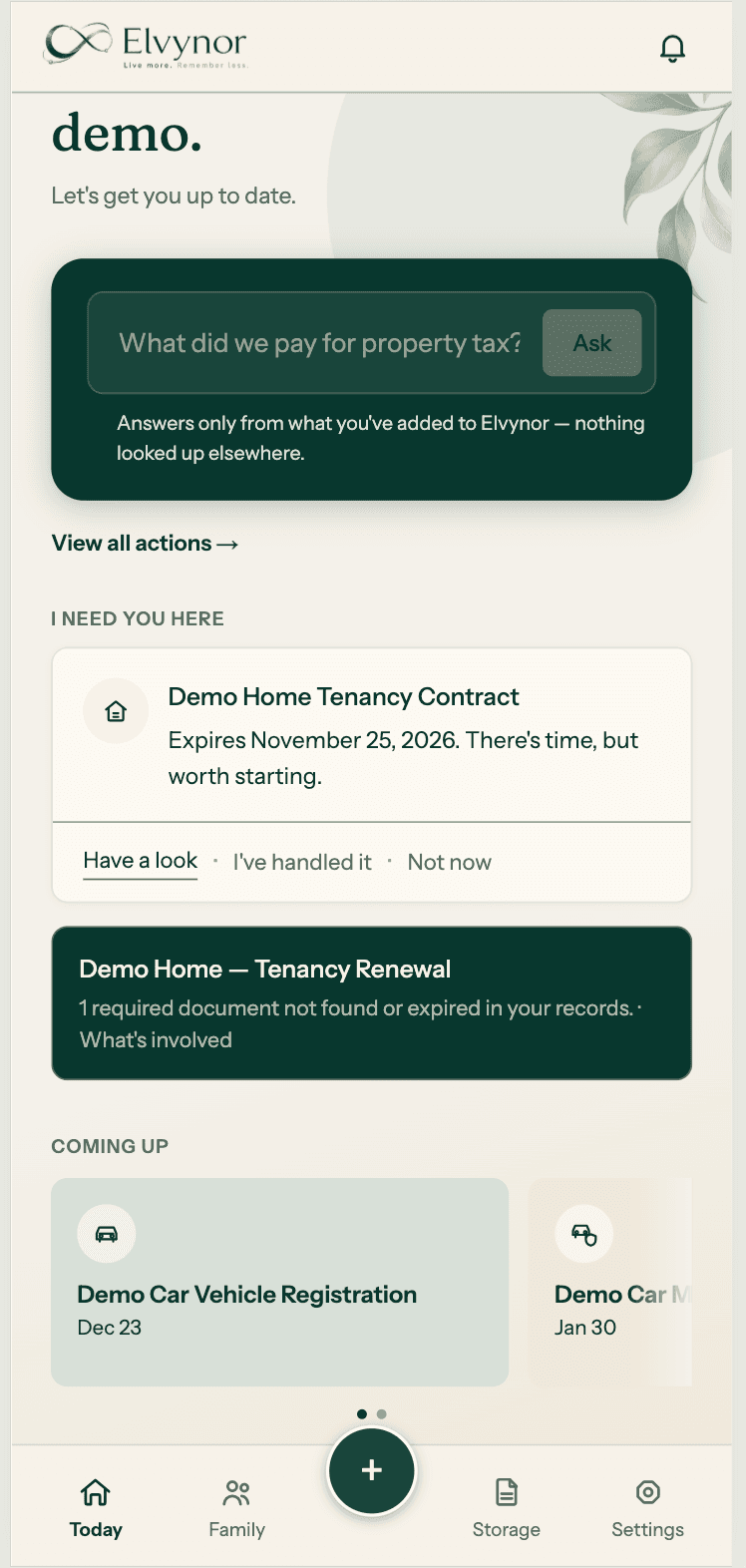
- What needs you now
- What a renewal involves
- What’s coming next
Act
When something’s coming up, know where to start.
Remember tells you this is coming up. Act shows what you may need to do next. For common renewals, Elvynor brings together what’s usually involved, so you’re not starting from a search engine.
Emirates ID renewal
General guidance. Always check with the authority.
Guidance available now for common UAE renewals, including Emirates ID, residence visa, passport, tenancy, vehicle registration and pet registration.
Your household
Everything, together —
for everyone you look after.
Every document belongs to someone or something: a person, your home, a car, a pet. Elvynor keeps them connected, so when you ask about your husband’s passport or the car’s insurance, it knows which one you mean.
People
Selva’s passport valid until Dec 2028
Home
Tenancy contract on file
Car
Registration and insurance on file
Pet
Simba’s rabies vaccination recorded
Illustrative example — not your data.
What Elvynor understands
The documents a household actually keeps.
People & identity
Passports, ID cards, visas, licences
Health
Vaccinations, reports, prescriptions
Home
Tenancy, title deeds, utilities
Vehicles
Registration and motor insurance
Pets
Vaccinations, registration and insurance
Travel
Trips and travel insurance
Insurance
Health, home, motor, travel and pet
Appliances
Warranties and invoices
Something else? Add it as “Other” and give it your own name.
Trust
Your life. Your information.
Your control.
Your documents are filed in your chosen drive
Elvynor is designed to keep your documents in storage you control. Today, the supported drive is Google Drive. When you upload a document, Elvynor holds it temporarily while it’s read and you review it. Once you confirm it, it’s saved to an Elvynor folder in your connected Google Drive and the temporary copy is removed.
Limited access to your Drive
Elvynor asks Google for access only to the files it creates in your Drive, not the rest of your Drive. You can disconnect Drive in Elvynor at any time. Your files stay where they are.
You check what Elvynor reads
Elvynor uses AI to read each document and suggest its important details, such as names, dates and numbers. You review them before anything is saved to your Drive. Elvynor keeps the details you confirm so it can answer your questions and remind you. Identity numbers stay hidden in answers until you choose to show them. You can delete a document from Elvynor at any time, and choose whether to remove it from your Drive too.
Coming soon
We are entering the market as a native app for iPhone and Android.

iPhone
Android
Live more.
Remember less.
Elvynor is being built for the things life asks you to remember.